

Quick Read
- This is LeapScholar’s main counselling app, not a test-prep app: its core purpose is to take you from an initial free counselling call through to a personalized, counsellor-prepared “Country Plan” covering your university shortlist, visa roadmap, financial estimate, and post-study job outlook, all in one app.
- The centrepiece feature is the Country Plan, built around four tabs, Roadmap, Shortlist, Finance, and Jobs, each populated with real, individualized data tied to your actual profile and preferred destination, not generic country information.
- The University Shortlist inside the app is engagement-first and currently caters to postgraduate (masters) applicants only on the app itself (the equivalent web tool also covers undergraduate); each shortlisted course shows its QS World University Ranking, exact tuition fee, program duration, and a “Why this course?” explainer, with a thumbs up/down feedback loop.
- The Finance tab doesn’t just show a raw cost estimate: it explicitly nets out realistic part-time work earnings against your estimated study cost, and the Jobs tab pairs a 5-year earnings-vs-expenses projection with real, named open roles at companies like Google, Amazon, and Microsoft in your target country.
- Beyond the Country Plan, the app also covers SOP and LOR drafting support, document checklists, application tracking, student visa and pre-departure guidance, and connects you directly to a named, verified counsellor you can call from inside the app at any point.
Quick facts
| Stat | Value |
|---|---|
| Country Plan tabs | 4: Roadmap, Shortlist, Finance, Jobs |
| University Shortlist coverage (in-app) | Postgraduate (master’s) only; the web version also covers undergraduate |
| Application priority tracker | 3 tiers (Top Priority, High Priority, Other), 7 ranked slots |
| Bottom navigation | 6 tabs: Home, Courses, Country Plan, Applications, IELTS, Shop |
| Cost | Free to download; core counselling and Country Plan funded via university partnerships |

Choose your dream country
 UK
UK
 USA
USA
 Germany
 Australia
 Ireland
 Canada
 UAE
UAE
 France
 Sweden
 Italy
Italy
 Other
Other
When do you want to study abroad?
What's your highest level of education?
Have you completed Class 12th?
What was your Class 12 CGPA/percentage?
Are you a student or a parent/guardian?
What do you want to study?
Select your current city
How Leap will help you

Personalised University Shortlist

Express Applications with Quicker Admits

End-to-End Application Support
What the App Actually Is
Functionally, the app is built around two things: an acquisition and onboarding flow that connects you to a real, named counsellor, and an engagement layer, the Country Plan, that turns your counselling conversation into a persistent, revisitable plan rather than something you hear only once on a call. The LeapScholar Study Abroad app is an “engagement-first” platform; rather than a form you fill out once, it's designed for you to keep opening, checking, and acting on over the weeks or months you're actually applying.
Quick Answer
The LeapScholar Study Abroad App is a counselling app: an onboarding flow that connects you to a named counsellor, plus an engagement-first Country Plan you keep revisiting through your application journey, not a one-time form.
Introduction
The LeapScholar Study Abroad App is where LeapScholar's free counselling relationship actually lives day to day, not as a marketing companion to the website, but as the tool your assigned counsellor uses to build and hand you a genuinely personalized plan. If you've had (or are about to have) a free counselling call with LeapScholar, this app is where the output of that call shows up: a Country Plan built specifically around your profile, career goals, and preferred destination. This page walks through exactly what's inside it, screen by screen, based on real in-app screenshots.
Feature Walkthrough
1. Getting Started: Your Counsellor and Your First Call
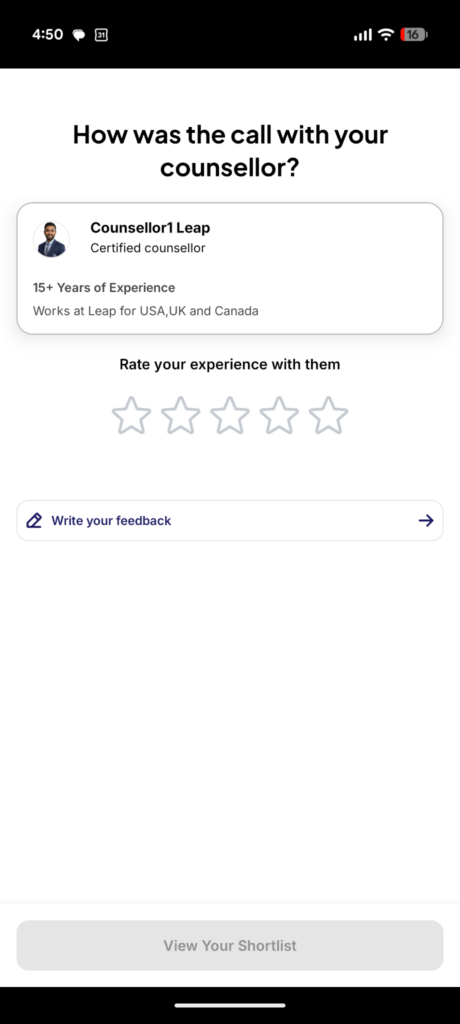
After a counselling call, the app prompts you to rate your experience with your specific, named counsellor (shown with their photo, years of experience, and the destinations they specialize in, for example, “15+ Years of Experience, Works at Leap for USA, UK, and Canada”) using a 5-star rating and an optional written-feedback field.
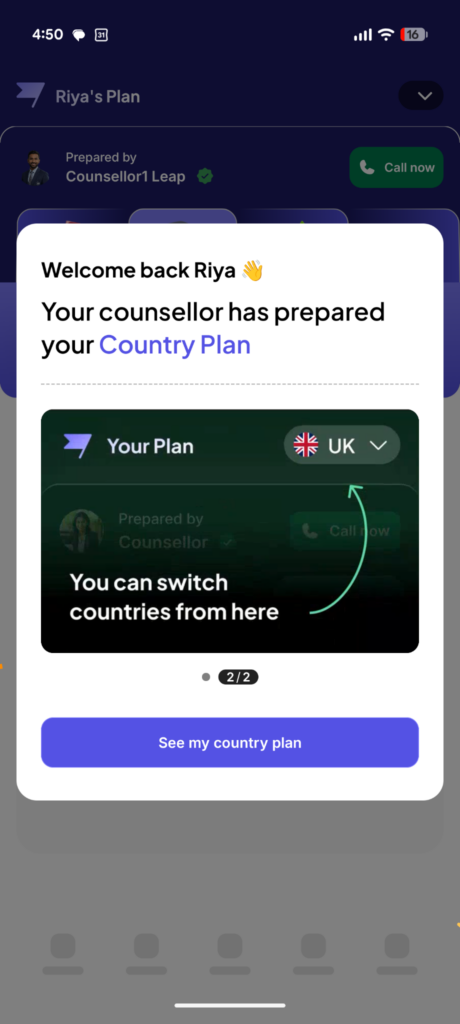
Once your counsellor has built your plan, the app surfaces a “Welcome back” onboarding moment specifically calling out that “Your counsellor has prepared your Country Plan,” with a short two-step tooltip walkthrough pointing you to the plan's tab structure and showing you how to switch between countries if you're evaluating more than one destination.
Quick Answer
After your free counselling call, you rate your named counsellor (shown with photo, experience, and destination specialty) and later see a “Welcome back” moment confirming your counsellor has built your Country Plan, with a short tooltip walkthrough of the plan tabs.
2. The Roadmap Tab
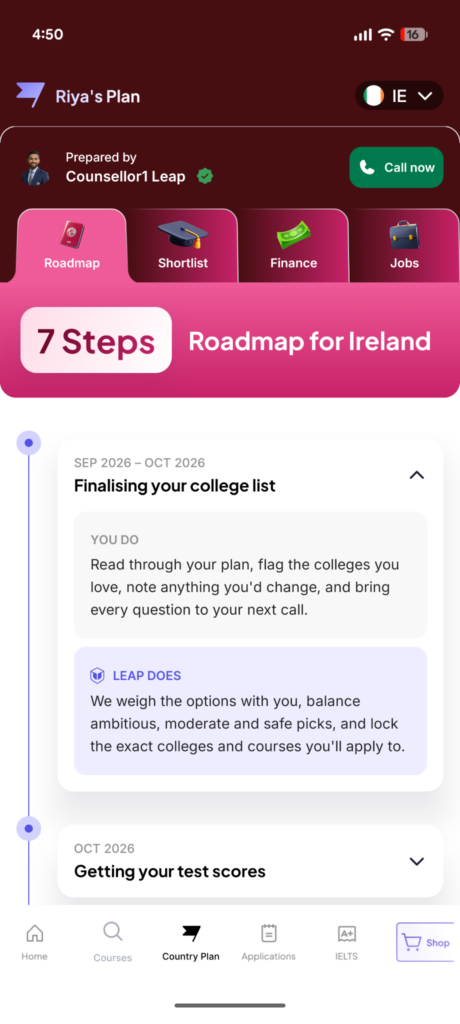
The Roadmap tab lays out a country-specific, time-stamped sequence, for example, a "7-Step Roadmap for Ireland," with each step showing a specific date range (such as “Sep 2026 – Oct 2026: Finalizing your college list”) and, distinctively, splitting responsibility explicitly into two columns: “You Do” (for instance, “Read through your plan, flag the colleges you love, note anything you'd change, and bring every question to your next call”) and “Leap Does” (for instance, “We weigh the options with you, balance ambitious, moderate, and safe picks, and lock the exact colleges and courses you'll apply to”). This You-Do/Leap-Does split runs through the entire roadmap, so at every stage it's explicit what's on the student and what LeapScholar is handling.
Quick Answer
The Roadmap tab gives a dated, country-specific step sequence (for example a 7-step Ireland roadmap) that splits every stage into “You Do” and “Leap Does” columns, so it's always explicit who is responsible for what.
3. The Shortlist Tab
The Shortlist Tab is the app-native version of LeapScholar's University Shortlist product, built specifically for engagement rather than a one-time output. It opens by showing you exactly what the shortlist is based on, your stated career goals (for example, “Software Development/Engineering,” “Web Development,” “Mobile App Development”) and preferred academic streams (for example, “Computer Science,” “Data Science”), before listing individual, real shortlisted programs.
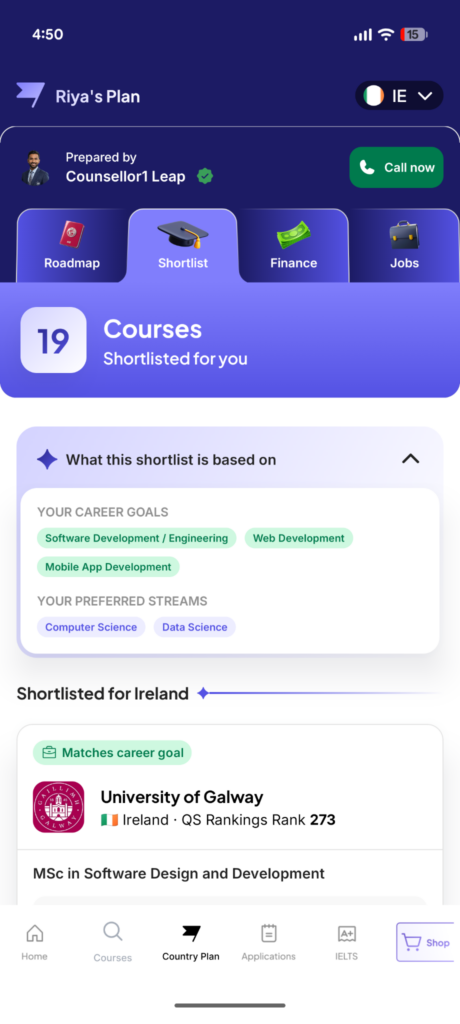
Each shortlisted course card shows the university name and logo, its country and QS World University Ranking (for example, “University of Galway, Ireland, QS Rankings Rank 273”), the specific program name, exact tuition fees (for example, “Rs. 40.2L”), program duration (for example, “2 years”), a “Why this course?” button explaining the match, and a thumbs up/down feedback control so the shortlist can improve over time.
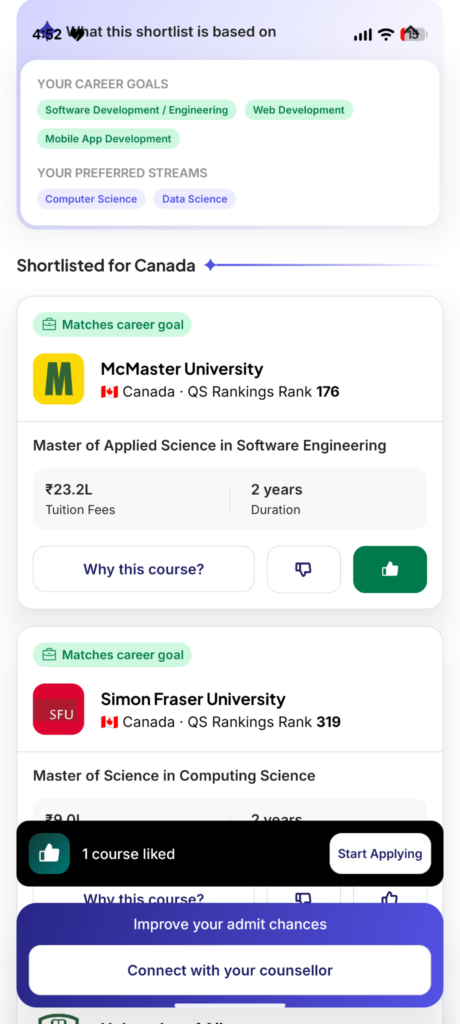
Once you like at least one course, a sticky bottom banner appears: “1 course liked, Start Applying,” alongside a persistent “Improve your admit chances, Connect with your counsellor” prompt, keeping the counsellor relationship active rather than letting the shortlist become a dead-end self-serve tool.
Quick Answer
The Shortlist tab shows real postgraduate programs matched to your stated career goals and streams, each with QS ranking, exact tuition, duration, a “Why this course?” explainer, and thumbs up/down feedback to refine future recommendations.
App-vs-Website comparison
| Aspect | App (Shortlist tab) | Website (Shortlist tool) |
|---|---|---|
| Approach | Engagement-first, open-ended, browsable | Acquisition-first, a short 7–8 question form |
| Filters | Up to 8 filters | Not applicable (form-based) |
| Coverage | Postgraduate (master's) only | Undergraduate and postgraduate |
| Output | Large, ongoing, browsable course catalogue | Top 50 course list |
3a. The Applications Tab: From Shortlist to Admit
Liking a course on the Shortlist tab is the start of a much longer, fully tracked journey, not the end of one. That journey lives under its Applications tab in the app's bottom navigation, separate from Country Plan, and it covers everything from saving a university through to a confirmed admit and fee deposit.
Saving and applying:
Every course you like gets saved to a dedicated "Liked Colleges" list, where each card shows the university, the program, a "Scholarship available" tag when relevant, and, distinctively, a realism label like "AMBITIOUS: Admits are competitive for this course," carried over from the same ambitious/moderate/safe framing used on the Roadmap tab. From there you can delete the course, tap "Know more," or tap "Apply" directly.

Tapping Apply doesn't submit anything immediately; it opens a confirmation modal, "Apply to [University]?", that sets expectations upfront: "Please be ready with your English test score, marksheets, and work documents," with an "I am sure" or "No, not at the moment" choice. This deliberate confirmation step means a student can't accidentally trigger an application, and it front-loads the document requirement so there's no surprise later.
The document checklist:
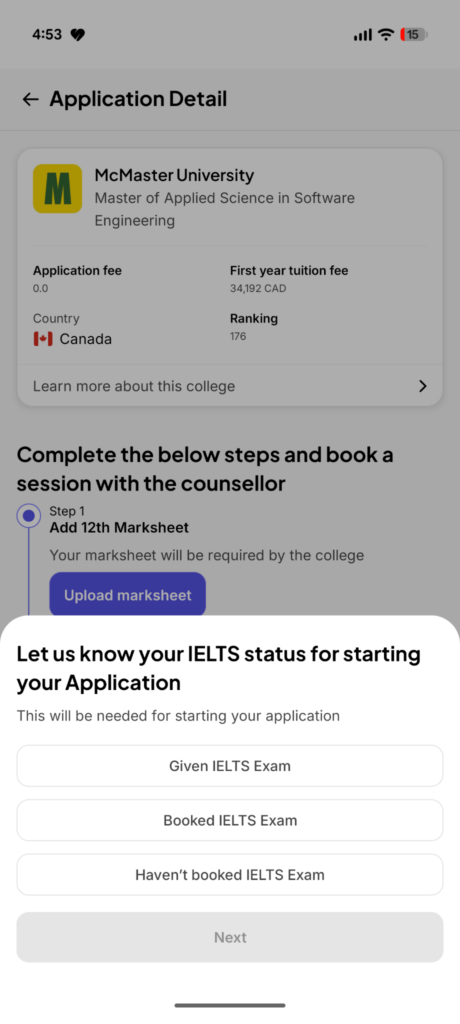
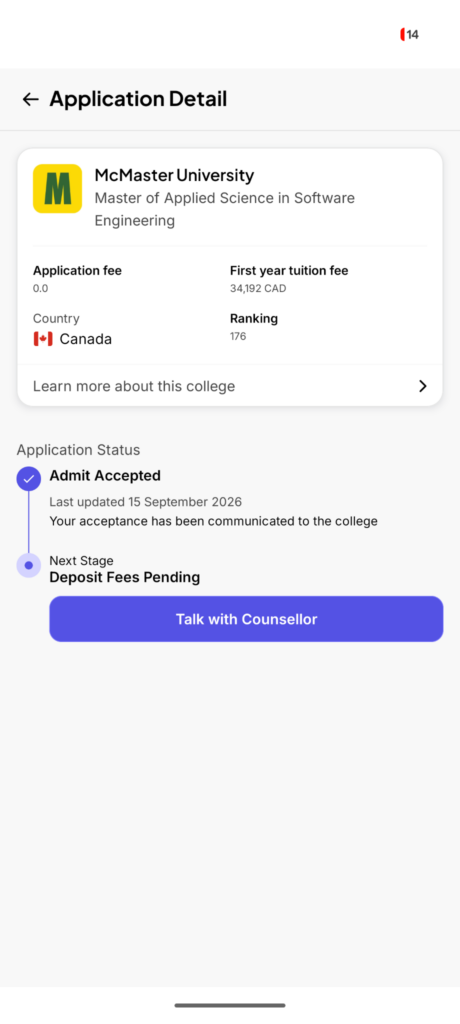
Confirming an application lands you on that university's Application Detail screen, now showing real, university-specific numbers, application fee, first-year tuition fee, country, and QS ranking, alongside a tracker that says, "Complete the below steps and book a session with the counsellor." Step 1 is consistently "Add 12th Marksheet," with a direct "Upload marksheet" button that opens a dedicated four-step upload flow ("Step 1/4"). Genuinely useful detail here: application fees are shown to vary meaningfully by university, for example, Rs. 0 (McMaster) versus roughly CAD 135 (University of Alberta) on real screens, so the app is transparent about cost differences at the point of application rather than only at the final payment stage.
Layered into this same readiness flow, the app also asks directly, "Let us know your IELTS status for starting your Application," with three options: Given IELTS Exam, Booked IELTS Exam, or Haven't booked IELTS Exam. This question is a real, functioning link between the counselling side of the app and its own IELTS prep tab, since your IELTS status directly gates how your application proceeds, not a cosmetic mention.
Setting application priority:
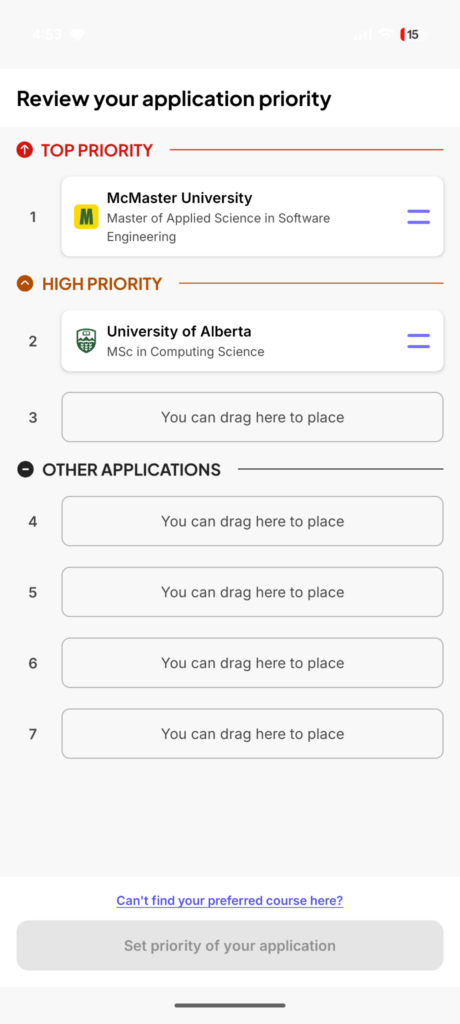
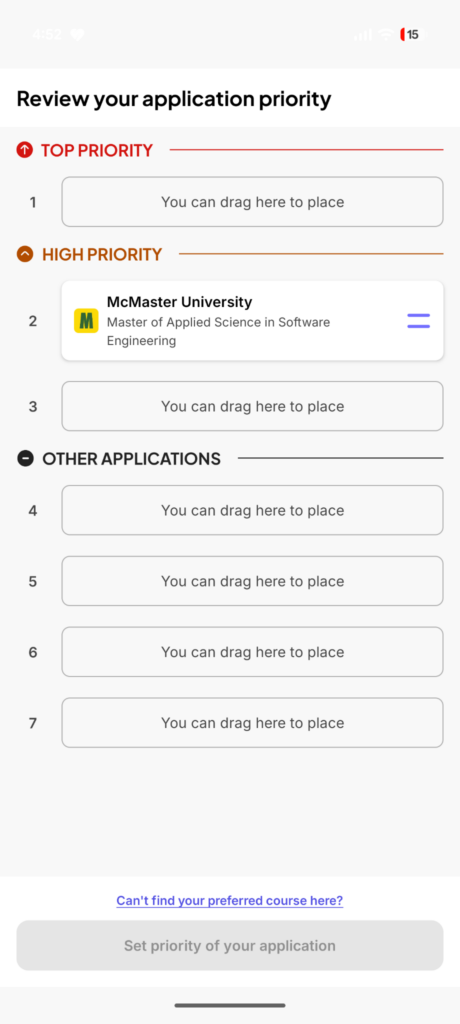
Because a student typically applies to more than one university, the app has a dedicated drag-and-reorder priority screen: "Review your application priority," organized into three tiers, Top Priority, High Priority, and Other Applications, with seven total ranked slots. A first-time onboarding overlay demonstrates the drag gesture directly on a sample card before you use it live. In practice, this means a student can apply to, say, McMaster and the University of Alberta, then physically drag McMaster into the Top Priority slot and Alberta into High Priority, changing that ranking at any time as decisions evolve, rather than being locked into whatever order they applied in.
Tracking applications and admits:
All of this rolls up into a single "My Applications" screen, organized by the same Top Priority / High Priority tiers, where each application shows a real, specific status line rather than a generic "pending" label, for example, "You have received an Unconditional Admit" for one application and "Application Drafted by Student" for another, each tagged "Ongoing" with a last-updated date and a "More Details" button.
Opening an individual application reveals a full vertical status timeline that continues past the admit itself:
Admit Received ("Congratulations, you have been accepted into the course and college," with a "View Admit Letter" link) leads to Admit Accepted ("Your acceptance has been communicated to the college"), which leads to Deposit Fees Pending as the next stage. At every single stage of this timeline, a named counsellor card sits directly below the status, photo, seniority tag, and destination specialisation, with a CTA button that changes wording to match the moment: "Discuss with Counsellor" right after an admit comes in, and "Talk with Counsellor" once you're deciding on a fee deposit. The counsellor relationship is never more than one tap away, and it's presented as contextually relevant to whatever stage you're actually at, not a static "contact us" link.
Quick Answer
Liking a course starts a tracked Applications flow: save to a Liked Colleges list with an ambitious/moderate/safe realism tag, confirm to apply through a document-readiness modal, complete a step-by-step document checklist (including IELTS status), and drag-reorder every application across Top Priority, High Priority, and Other Applications tiers, with a status timeline and named-counsellor CTA at every stage through to fee deposit.
4. The Finance Tab
Rather than a single scary total, the Finance tab opens with a clear estimated range (for example, “Rs. 30L-55L Study cost, Estimated, Based on Ireland Shortlist”), then breaks it into two components: College Fees and Rent/food/daily costs, shown as a proportional bar.
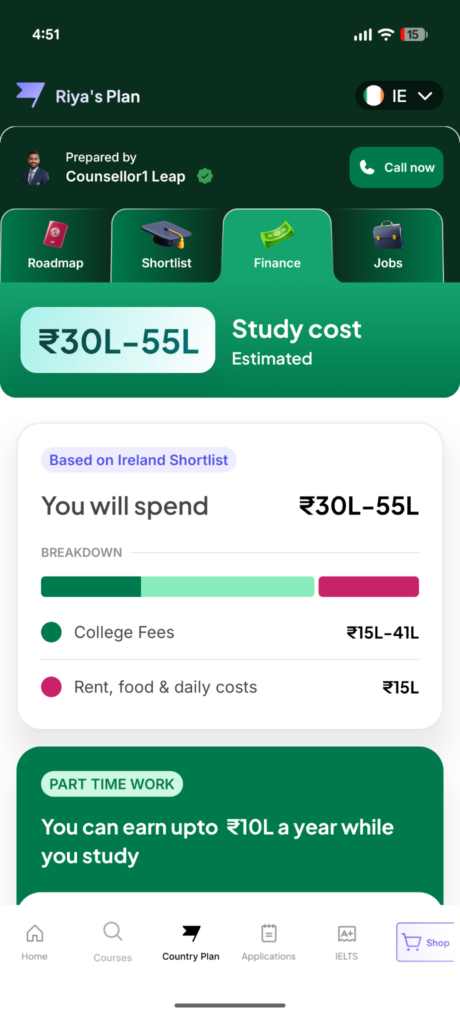
The distinctive part is what comes next: a dedicated “Part Time Work” section stating what you can realistically earn while studying (for example, “You can earn up to Rs. 10L a year while you study”), which the app then nets directly against your total cost, showing the reduced effective cost (for example, dropping from Rs. 30L-55L to Rs. 20L-45L), with a plain-language explanation of what that part-time income realistically covers (“Enough to cover your rent, food, and daily costs, with some left for tuition"). Most students work on campus or in retail, cafes, and tutoring. No prior experience is needed, and the information is explicitly sourced to that destination's actual student work-rights rules.
Quick Answer
The Finance tab shows an estimated total study-cost range split into College Fees and Rent/food/daily costs, then nets a realistic part-time earnings estimate against that total to show your reduced effective cost.
5. The Jobs Tab
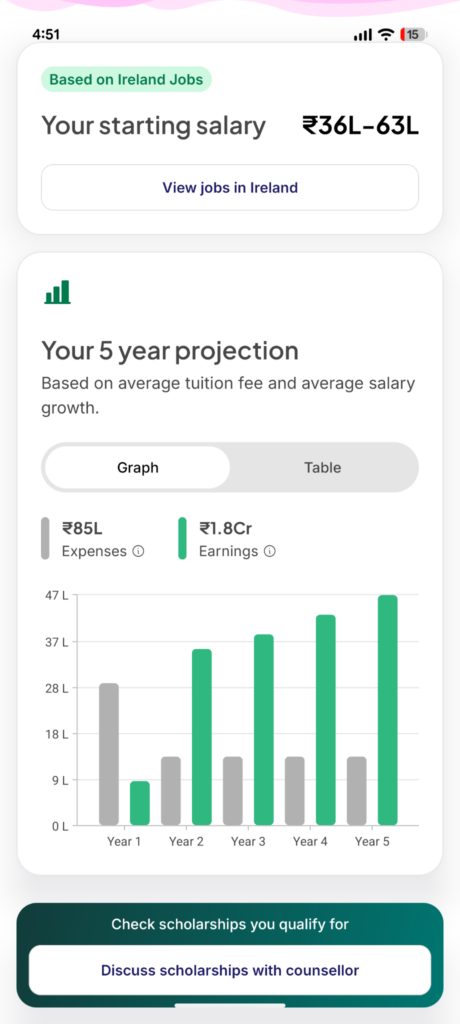
The Jobs tab opens with your projected starting salary range in your target country (for example, “Rs. 36L-63L”), followed by a genuinely useful "5-year projection” comparing your cumulative expenses against your cumulative earnings, shown as a toggleable bar graph or table (for example, roughly Rs. 85L in expenses against roughly Rs. 1.8Cr in earnings over five years, based on average tuition and average salary growth).
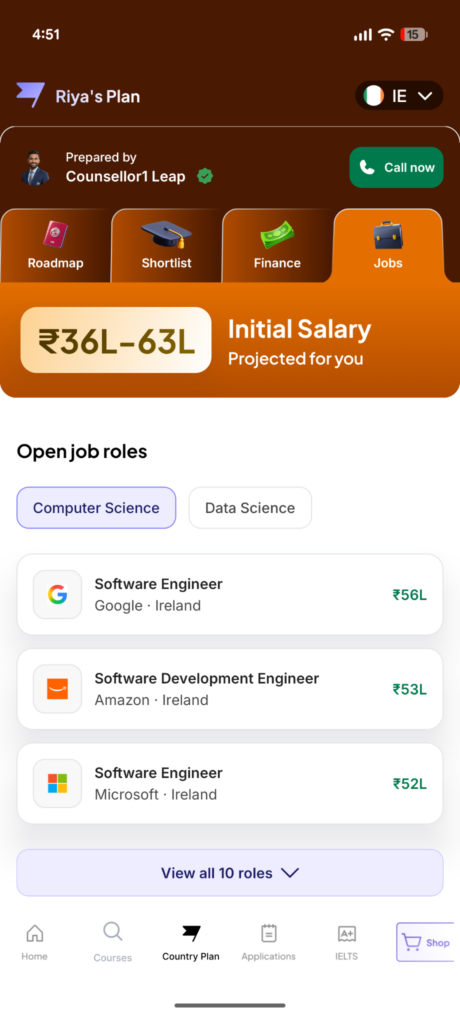
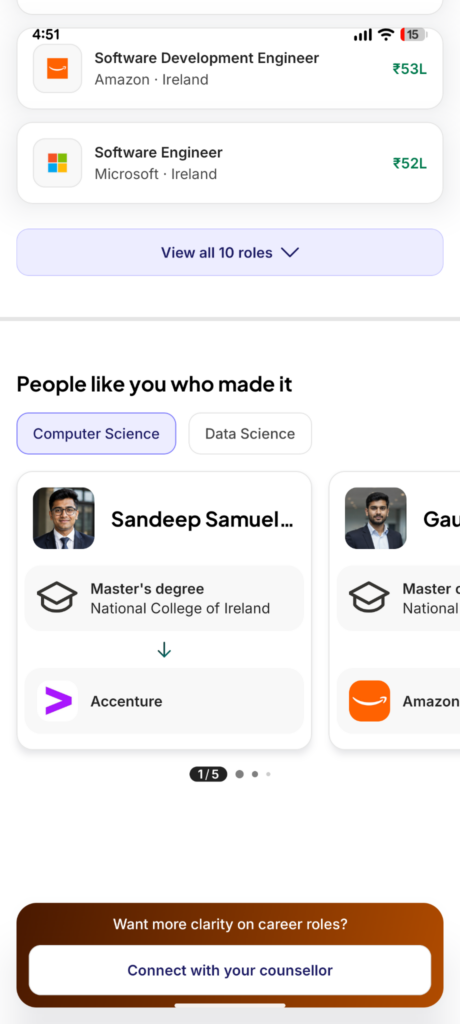
Below the salary projection sits a genuinely concrete, non-generic section: real, named “Open job roles” filtered by your preferred stream (for example, Computer Science or Data Science), listing actual current openings at real companies in your target country (for example, “Software Engineer, Google, Ireland, Rs. 56L”; “Software Development Engineer, Amazon, Ireland, Rs. 53L”; “Software Engineer, Microsoft, Ireland, Rs. 52L”), with a “View all 10 roles” expansion.
A “People like you who made it” carousel closes out the tab, showing real-format alumni-style outcome cards (a named student's master's degree and institution, with an arrow to their resulting employer, for example, a National College of Ireland graduate now at Accenture), reinforcing the salary and job data with actual outcome stories rather than leaving it as an abstract projection.
Quick Answer
The Jobs tab shows a projected starting-salary range and a 5-year earnings-vs-expenses projection, alongside real, named current job openings at companies like Google, Amazon, and Microsoft in your target country, plus an alumni-outcome carousel.
6. Beyond the Country Plan
Per the app's own live store listing, the app also covers, outside the four Country Plan tabs: Statement of Purpose (SOP) and Letter of Recommendation (LOR) drafting support, resume reviews, document checklists, application tracking, student visa guidance and interview preparation, accommodation assistance, and forex and travel support for the pre-departure stage. The bottom navigation bar reflects this full scope directly: Home, Courses, Country Plan, Applications, IELTS, and Shop, confirming that IELTS prep and the Country Plan sit inside the same navigation as the broader application and visa journey, not as separate, disconnected tools.
Quick Answer
Outside the four Country Plan tabs, the app also covers SOP/LOR drafting, resume reviews, document checklists, application tracking, visa and pre-departure guidance, and a direct line to your named counsellor.
7. Closing the Loop: Feedback
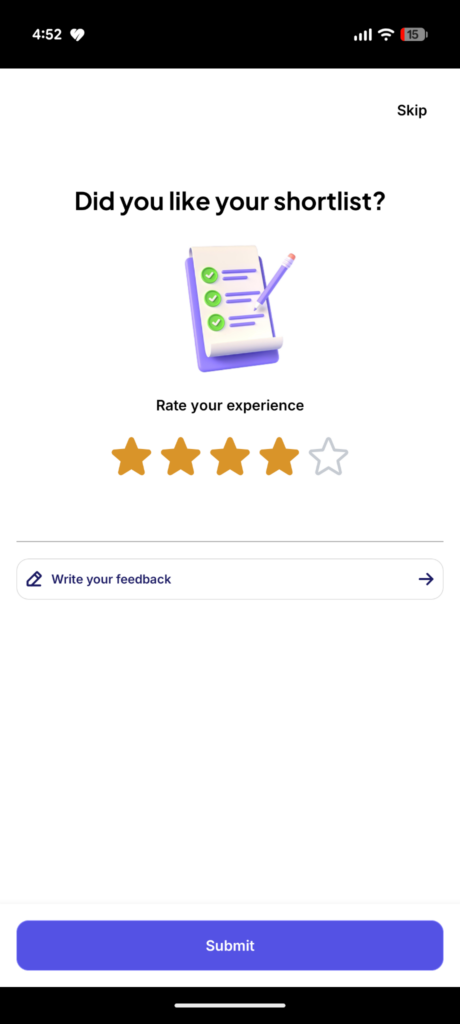
At the end of a session with your shortlist, the app explicitly asks, “Did you like your shortlist?" with a 5-star rating and an optional written-feedback field, and a skip option for anyone who'd rather not respond, keeping the feedback loop genuinely optional rather than forced.
Quick Answer
After using your shortlist, the app asks a simple 5-star question: “Did you like your shortlist?” with optional written feedback and a skip option.
How to Download
Download the LeapScholar Study Abroad App
This link routes to the correct store automatically depending on whether you're on iOS or Android.
Frequently Asked Questions About LeapScholar Study Abroad App
-
Do I need to have already spoken to a counsellor before I can use this app?
No. You can download the app and begin the profile and goal-setting flow independently; the fullest version of the Country Plan experience, however, is built around having had at least one free counselling call, since your named counsellor is the one who actually prepares your personalised Roadmap and Shortlist.
-
Is the University Shortlist inside the app the same as the one on the LeapScholar website?
They're related but distinct. The app version is “engagement-first,” open-ended, and browsable, with up to 8 filters and a large course catalogue, and currently limited to postgraduate (master's) applicants. The web version is “acquisition-first,” a shorter 7-8 question form leading to a Top 50 course list, and it covers both undergraduate and postgraduate.
-
How accurate are the salary and job listings in the Jobs tab?
The starting-salary ranges and 5-year projections are estimates based on average tuition costs and average salary growth for your shortlisted programs and destination, not a guarantee. The specific “Open job roles” listed (for example, named roles at Google, Amazon, or Microsoft) reflect real, current openings pulled into the app, but availability and eligibility for any specific role depend on the employer's own hiring process, not LeapScholar.
-
Does the Finance tab's part-time work estimate account for visa-specific work-hour limits?
Per the app's own framing, the part-time earning estimate is explicitly “based on working rules for students” in your specific target country, meaning it should reflect that country's current student work-hour limits. Always confirm the current legal work-hour limit for your specific visa type directly with your counsellor before relying on this figure for financial planning, as immigration rules can change.
-
Can I switch between countries inside the same Country Plan, or do I need a new plan for each?
You can switch countries from within the same Country Plan using the country selector shown in the app's header (demonstrated during onboarding with a UK-to-Ireland-style switch), rather than needing an entirely separate plan or app session for each destination you're evaluating.
-
What happens if I don't like any of the courses in my shortlist?
The shortlist includes a thumbs up/down feedback control on every course card specifically so the recommendations can be refined; beyond that, the persistent “Connect with your counsellor” prompt is designed for exactly this situation, letting you go back to your named counsellor to adjust your shortlist criteria directly rather than being stuck with a static, unchangeable list.
-
Is the IELTS prep in this app the same as the separate IELTS Prep by LeapScholar app?
The Study Abroad App's bottom navigation includes a dedicated IELTS tab, and the two apps share the same underlying IELTS content. For the deepest, most feature-complete IELTS experience, specifically mock-test volume, the full AI speaking module, and vocabulary quizzes, the dedicated IELTS Prep by LeapScholar app is the more complete standalone tool; treat the Study Abroad App's IELTS tab as the integrated, at-a-glance version within your broader counselling journey.
-
Does the app cost anything to download or use?
The app itself is free to download, and core counselling, profile assessment, the Country Plan, and connecting with a counsellor are funded through university partnerships rather than being charged directly to students. Separate paid products, like structured IELTS or PTE test-prep courses, are accessed through their pricing, not the core features of the LeapScholar Study Abroad App.











Have Questions? Get Guidance to reach your Dream University
Connect with India's finest counsellors and biggest study abroad community.
Get Guidance