
Quick Read
- The F-1 visa application fee is about INR 17,600 (USD 185).
- Pay the SEVIS student-database fee, about INR 33,300 (USD 350), before applying.
- You have 30 days to return to an unfinished DS-160.
- The US embassy tells F-1 applicants to make social media public.
How to Fill DS-160 Form for an F-1 Visa: Is It Hard?
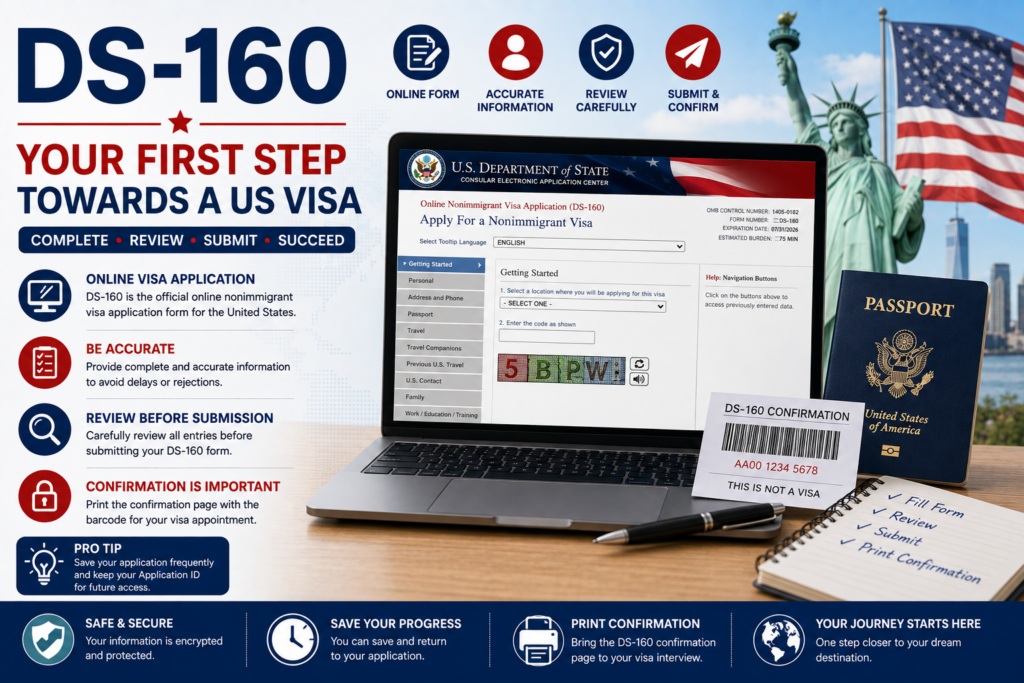
The DS-160 is the online application every F-1 applicant fills in before the visa interview, and you can save it and come back to it. Worried about how to fill DS-160 form pages without one costly slip? The DS-160 is the US online nonimmigrant visa application (“nonimmigrant” means a temporary stay, such as study). The F-1 visa is the US student visa.
The DS-160 is one step in the wider F-1 visa process. It isn’t an admission document; the consular officer (the State Department official who interviews you) can see it at your interview.

Choose your dream country
 UK
UK
 USA
USA
 Germany
 Australia
 Ireland
 Canada
 UAE
UAE
 France
 Sweden
 Italy
Italy
 Other
Other
When do you want to study abroad?
What's your highest level of education?
Have you completed Class 12th?
What was your Class 12 CGPA/percentage?
Are you a student or a parent/guardian?
What do you want to study?
Select your current city
How Leap will help you

Personalised University Shortlist

Express Applications with Quicker Admits

End-to-End Application Support
Is it hard? It's long and more than tricky, and three things help:
- It saves as you go: each page saves when you finish it.
- Errors can be fixed: the embassy can reopen a submitted form for correction.
- "Does Not Apply" exists: use it where a question doesn't fit you.
So how to fill out the DS-160 form answers well is simple: copy from your documents, never guess. This content is general information, not legal advice; the US Department of State decides visas, so check its pages and the US Embassy India pages before you submit.
Sources: US Department of State: Student Visa
How to Fill DS-160 Form: What to Keep Ready Before You Start
Before you learn how to fill DS-160 form pages, keep your passport and I-20 open, because most answers come from them. The I-20 is the form your US school sends after admission. SEVIS is the US government database of international students, and your SEVIS ID is your record number, printed on the I-20.
Read each row as what to keep, what the form asks, and where it comes from.
| Item | What the form asks | Where it comes from |
| Passport | Number, issue, and expiry dates | Your passport |
| I-20 | SEVIS ID, school name, and address | Your school |
| SEVIS fee receipt | Not asked; show it later | Your I-901 payment |
| Travel itinerary | Travel plans | Only if already booked |
| Previous US trips | Dates of your last five trips | Old passports and visas |
| Résumé or CV | Education and work history | Your CV |
| Social media | Platforms and usernames | Your own accounts |
No I-20 form yet? Wait, because the SEVIS ID and school address come from it. Your passport must be valid at least six months beyond your period of stay, unless a country agreement exempts you. If your spouse or children will join you, each will need their own I-20, a separate application, and a dependent visa but will not need to pay a SEVIS fee (the student-database fee).
My insight: Copy names, dates, and numbers from your passport and I-20 with both open, never from memory or an old form, because every answer must match your documents.
Sources: US Department of State: DS-160 FAQ
How to Fill DS-160 Form and What You Pay: Fees in INR
Your F-1 visa application fee is about INR 17,600 (USD 185), and the SEVIS fee is about INR 33,300 (USD 350). Here's what each one is:
- MRV fee: the MRV fee is the visa application fee; it's non-refundable and non-transferable, paid whether or not the visa is issued.
- SEVIS fee: the SEVIS fee is the I-901 fee for the student database, paid before you apply.
The SEVIS fee goes to the US government, not your university. Here are both in INR:
| Fee | Amount | When you pay |
| MRV visa application fee (F-1) | INR 17,597 (USD 185) | Before the interview |
| SEVIS I-901 fee | INR 33,292 (USD 350) | Before you apply for the visa |
| Total of these two fees | INR 50,889 (USD 535) | Across the process |
Fees are converted at 1 USD = INR 95.12 as of October 2026 and will shift with the exchange rate, so check the latest rate before paying.
The US Embassy in India sets its own consular exchange rate for rupee payments, which was INR 98 per USD from 25 May 2026, so what you pay in rupees can differ from this table. A visa issuance fee may also apply depending on your nationality.
So plan about INR 50,900 for these two fees, which is small next to the cost of studying in the USA. Our breakdown of US visa fees covers later costs.
My insight: Pay the visa fee only when you're ready to book your interview, because it's non-refundable and non-transferable and can't be moved to another application.
Sources: US Department of State: Fees for Visa Services, ICE: I-901 SEVIS Fee, US Embassy India: Important Visa Information
How to Fill DS-160 Form Step by Step: Start, Save, and Return
You fill in the form on CEAC, and you receive an application ID once you choose and answer a security question. CEAC is the Consular Electronic Application Center, the US government website for the form. The application ID is the unique number for your form, and you need it to come back.
- Open the form: go to the CEAC DS-160 page (linked below) and start a new application.
- Pick your location: India has five posts: New Delhi, Mumbai, Chennai, Kolkata, and Hyderabad.
- Save your ID: answer a security question, then write down the application ID and the answer.
- Answer in English: pick "Does Not Apply" only where a question truly doesn't apply.
- Click Next on every page: each page saves when you finish it.
- Come back within 30 days: use your application ID and security answer.
- Keep a copy longer: Save Application to File stores the form on your computer.
- Submit: review every page, upload your photo, and submit.
After you submit, you get a confirmation page, which is the barcode page you print and bring to the interview. That's how to fill DS-160 form pages without losing work.
Sources: CEAC DS-160 portal
How to Fill DS-160 Form Section by Section for Indian Applicants
Knowing how to fill DS-160 form sections is easier once you see what each area asks. Use the table as a checklist before you click Next.
| Section | What it asks | What to check |
| Personal | Names, birth date and place, sex at birth | Names exactly as in your passport; FNU if no given name |
| Native alphabet name | Your name in your own script | The only answer not in English |
| Nationality and ID | Nationality, national ID number | Answer truthfully |
| Travel | Purpose, dates, US address | Your school's address from the I-20 |
| Previous US travel | Earlier visits and visas | Last five trips; any refusal stated truthfully |
| Address and phone | Home address, phone | A primary phone you answer |
| Passport | Number, issue, and expiry dates | Typed from the passport |
| US contact and school | SEVIS ID, school details | Copied from your I-20 |
| Work and education | Schooling, past employers | Only your previous two employers |
| Security | Yes or no questions | Read each one in full |
Mandatory questions can't be left blank, so the form won't submit until they're answered. "Other names" means any name you've used, such as a maiden, religious, or professional name. The national ID number is a unique number your government may have given you.
My insight: Do the whole form in one sitting with your passport and I-20 open; if you must stop, return within 30 days and reread the earlier pages before you submit.
How to Fill DS-160 Form: Sample Answers With Placeholders
A DS-160 sample shows where each answer comes from, never what to write, because every answer must be true and match your documents. Each bracket names the detail you copy in.
| Field on the form | What to enter | Where it comes from |
| Surname | [SURNAME as in your passport] | Passport data page |
| Given names | [GIVEN NAMES as in your passport] | Passport data page |
| Passport number | [PASSPORT NUMBER] | Passport data page |
| SEVIS ID | [SEVIS ID from your I-20] | Your I-20 |
| School address | [SCHOOL ADDRESS as on your I-20] | Your I-20 |
| Who pays | [YOUR TRUE ANSWER, such as self or parent] | Your funding documents |
| Social media | [PLATFORM] and [USERNAME] | Your own accounts |
The officer can see your form at the interview. That's how to fill DS-160 form fields safely: from your own papers, every answer is true.
Common DS-160 Mistakes to Avoid
Most DS-160 problems trace back to one of these. All of this is already covered above, grouped here as a final check before you click Submit.
- Spelling mismatch: your name, passport number, and dates must match your passport exactly, including any name you've used before (the "other names" field covers a maiden, religious, or professional name).
- Wrong SEVIS details: a mistyped SEVIS ID or a school address typed from memory instead of copied from your I-20 is one of the easiest errors to make.
- Picking "Does Not Apply" incorrectly: use it only when a question genuinely doesn't apply to you, not as a shortcut past something you're unsure how to answer.
- Leaving mandatory fields blank: the form won't submit until every mandatory question is answered.
- Listing the wrong number of past employers: the work and education section asks for your previous two employers only, not your full history.
- Forgetting to set social media accounts to public: the US embassy in India requires F-1 applicants to set every listed account to public before their interview.
- Letting the 30-day window lapse: if you haven't used Save Application to File, a form you don't return to within 30 days is lost, and you'll need to start over.
How to Fill DS-160 Form: Photo, Social Media, and Security Questions
The last stretch of how to fill DS-160 form answers covers one photo, your social media, and the security questions. Each has its own rule.
Photo rules:
- Recent and in color: taken within the last 6 months, on a plain white or off-white background.
- Face clear: neutral expression, both eyes open; no eyeglasses except in rare medical cases.
- File: a square JPEG of 240 kB or less, 600 x 600 to 1200 x 1200 pixels.
- Upload fails: an X shows on the confirmation page, so bring one printed photo.
Read the full US visa photo requirements before you upload.
Social media, two steps:
- List your accounts: each platform and username you've used.
- Set them to public: the US embassy in India tells F, M, and J applicants to set every account to "public" or "open."
The embassy says this helps it check your identity. For the security questions, read each one in full and answer truthfully.
My insight: Write down every account name and check each privacy setting before you submit, because the embassy tells you to set them to public.
Sources: US Department of State: Photo Requirements, US Department of State: Digital Image Requirements, US Embassy India: Visas, Washington University OISS: DS-160
After You Fill DS-160 Form: Confirmation Page, MRV Fee, and Interview
After you submit, you print the confirmation page, pay the MRV fee, and book your interview. Once you know how to fill DS-160 form pages, these steps follow:
- Print the confirmation page: you need it at every phase; reprint it through Retrieve Application.
- Pay the MRV fee: follow the embassy's instructions and keep your MRV fee receipt.
- Book online: pick one of the five India posts and check F-1 visa slots early.
You can get the visa up to 365 days before your program starts, but you can't enter more than 30 days before the start date. A visa doesn't guarantee entry: US Customs and Border Protection (CBP) decides at the airport.
For what happens after you submit, from paying the MRV fee to the interview itself, our guide on how to apply for a student visa for the USA walks through each of the remaining steps.
DS-160 Versus DS-260 : What's the Difference?
The DS-160 is for temporary stays such as study, while the DS-260 is the form for people moving to the US permanently. Here's the difference:
| Form | Used for | For an F-1 student? |
| DS-160 | Temporary (nonimmigrant) visas such as F-1 | Yes, this is your form |
| DS-260 | Immigrant (permanent residence) visas | No, not for study |
So how to fill DS-160 form steps is all you need for study.
What If You Made a Mistake, Lost Your Application ID, or Got Refused?
If you find an error after submitting, you can't edit the form, but the embassy can reopen it so you can correct it with your application ID. Even if you know how to fill out the DS-160 form pages well, mistakes can still happen:
- Error after submitting: tell the embassy or consulate where you're applying and follow its instructions.
- India appointment booked: if it was booked on or after 15 November 2023, bring the original and corrected confirmation pages, or cancel and rebook with the corrected number.
- Lost confirmation page: select your embassy on CEAC, choose Retrieve Application, and enter your application ID.
- Lost ID or 30 days passed: start a new form unless you saved a copy to file.
- Visa refused: the fee isn't refunded; reapplying means a new application and fee, except after a 221(g) refusal.
A 221(g) refusal means incomplete documents; you have one year to send them. A 214(b) refusal means the officer wasn't shown that you qualify or will return home. If you're refused under section 214(b), reapply with evidence of real change, and learn the reasons behind US visa rejections.
My insight: If you spot an error before your interview, tell the embassy right away and bring the corrected confirmation page, because India's posts ask for it along with the original.
Sources: US Department of State: Visa Denials
3 Takeaways on How to Fill DS-160 Form
- Get your I-20 first: the core of how to fill DS-160 form pages is copying from your passport and I-20.
- Budget about INR 50,900 (USD 535): that covers the visa and SEVIS fees, and the visa fee can't be refunded.
- Guard your application ID: return within 30 days, and, as the embassy tells you to, set social media to public.
Talk to a Leap Scholar counselor to check your DS-160 answers against your I-20 before you submit.
Frequently Asked Questions About How to Fill DS-160 Form
-
What is the DS-160 form, and who needs it?
The DS-160 is the US online nonimmigrant visa application, and every temporary-visit applicant fills it, including F-1 students. It isn't the form for permanent residence, which is the DS-260. You submit it on the CEAC website before you book your visa interview.
-
How do I fill out the DS-160 form if I don't have my I-20 yet?
You can't finish it properly, because the form asks for the SEVIS ID and school address printed on your I-20. Wait for the I-20 from your school and pay the SEVIS fee, then start with your passport and I-20 open.
-
How long can I leave an unfinished DS-160 form?
You have 30 days to return to a partially completed form, using your application ID and security answer. To keep it longer, use Save Application to File. Part of how to fill DS-160 form pages safely is writing that ID down at once.
-
How much is the DS-160 fee for an F-1 visa in INR?
The F-1 visa application fee is about INR 17,600 (USD 185) at the October 2026 rate, and the SEVIS fee adds about INR 33,300 (USD 350). The embassy uses its consular rate for rupee payments, so your amount can differ.
-
Can I edit the DS-160 form after I submit it?
You can't change a submitted form yourself. Tell the embassy or consulate where you're applying, and if it reopens the form, correct it with your application ID. At the India posts, bring both the original and corrected confirmation pages, or rebook.
-
How do I reprint my DS-160 confirmation page?
Go to the CEAC website, select the embassy or consulate where you're applying, choose Retrieve Application, and enter your application ID. Learning how to fill DS-160 form steps includes keeping this page safe, because you need it at every phase.
-
Do I have to list my social media accounts on the DS-160?
The form asks for the platforms and usernames you've used. The US embassy in India also tells F-1 applicants to set every account to public, so check each privacy setting before submitting. Answer truthfully, and write your handles down before you start the form.
-
What does "Does Not Apply" mean on the DS-160 form?
It's the option to pick when a question genuinely doesn't fit your situation, such as a field asking for details of a spouse you don't have. Use it only when a question truly doesn't apply to you, never as a shortcut past something you're unsure how to answer, since every answer on the form must be accurate.










Have Questions? Get Guidance to reach your Dream University
Connect with India's finest counsellors and biggest study abroad community.
Get Guidance